

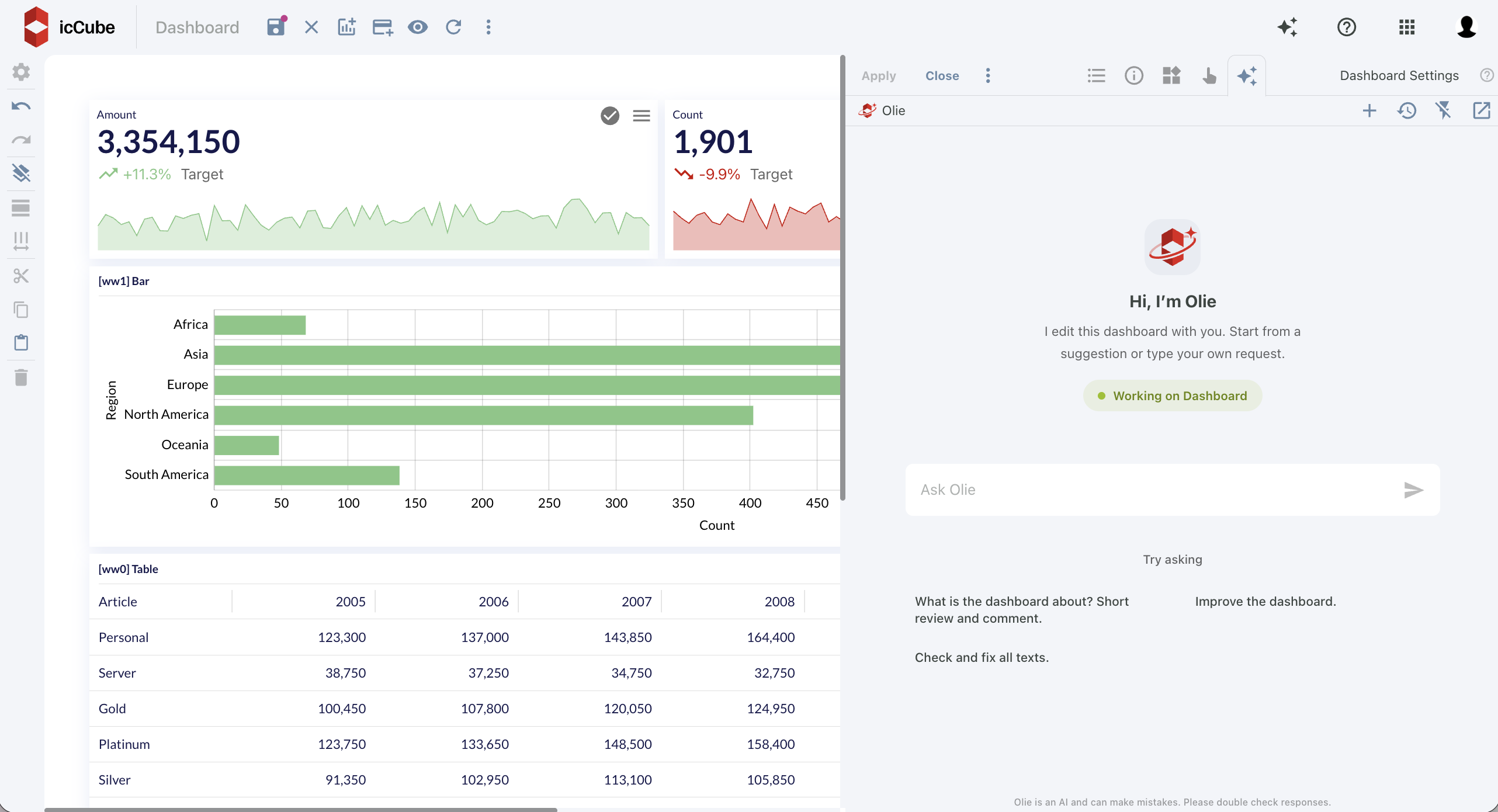
icCube 10 is now available, released in November 2026. It adds a secure MCP server, the Olie AI chatbot and AI Assistants for the Dashboard Editor and the MDX IDE. Every one of them works only with the data each user is allowed to see.
icCube 10 at a glance
A secure MCP server that has the user's own access rights
icCube 10 includes an MCP server, so AI agents and assistants can work with your icCube data through the standard Model Context Protocol. The agent connects as an icCube user, with that user's access rights. If you cannot see a dashboard, a schema, certain dimensions or a given cell, neither can the agent using it.
Agents can discover your schemas, check an MDX query before running it, and then run it. That keeps answers grounded in your real data, not in the model's guesses.
Connecting external agents is in its early stages, and we're expanding it; tell us your use cases. Setup is in the MCP Server documentation.
Olie: an AI chatbot to talk with your data
Olie, the Chatbot App, answers questions about your data in plain language, using only the data you have access to. If you can access one schema, it picks it for you; if you can access several, it asks which one to use.
Three built-in actions start common tasks:
- Analyze data questions: explore trends and values
- Summarize dataset: get a high-level summary of a dataset
- Create manager report: turn analysis into an executive-style report
Olie shows its results as tables. You can open it inside your own application with one JavaScript call and pass it context, such as your app's current filters (example on GitHub).
AI Assistant for the Dashboard Editor
The Dashboard Editor assistant helps you build and update dashboards without leaving the editor. It can:
- Build and edit widgets: create widgets, or change visual options, colors and formatting
- Set up data and queries: write, fix and optimize MDX queries and calculated measures
- Manage the layout: move widgets on the canvas and update dashboard settings
- Guide you: give step-by-step help with the editor and administration menus
It answers icCube questions only, and refuses off-topic ones with examples of what you can ask. When it doesn't know, it says so and points you to the icCube documentation instead of guessing.
AI Assistant for the MDX IDE
The MDX IDE assistant, the MDX Expert, helps you:
- Design and write complex MDX queries faster
- Debug and validate: find syntax errors, logic issues and performance bottlenecks
- Optimize query speed and resource use
- Understand your schema: inspect and navigate the cube
It reads your schema definition, validates its queries and looks up icCube MDX functions before answering.
AI Assistant widget for dashboards
The AI Assistant widget sits inside a dashboard and lets users explore and query widget data in plain language. In icCube 10 it can be linked to several widgets instead of one. See the widget documentation.
Opt-in AI, your choice of LLM, and pricing
AI in icCube 10 is 100% opt-in. All assistants run on a separate, optional AI Server; without it, icCube works exactly as before.
- You decide who gets AI. No role, old or new, gets AI features until you grant them.
- You choose the LLM. Anthropic, OpenAI, Google, Mistral AI, AWS Bedrock, DeepSeek, Alibaba and OpenRouter work out of the box, with your own API key.
- The AI Server stays private. It doesn't need to be reachable from the internet; only your icCube instances connect to it.
- Check your LLM provider's data policy. Schema metadata and data may be sent to the LLM you choose.
AI features are included in your icCube license at no extra charge. Your only AI cost is LLM usage, which you control.
What's next
These are on our roadmap and not part of icCube 10 yet:
- a dashboard assistant for viewers
- an assistant for administration and schema creation
- an MCP server for scheduling and managing schemas
Get started with icCube 10
- Upgrade to icCube 10 (see the release notes).
- Install the AI Server and connect your LLM (AI Server guide).
- Grant AI permissions to the roles that should use AI.
For more information check the AI overview.
These AI capabilities are under active development. Send comments and feature ideas through our contact page.
FAQ
Can an AI agent see data the user is not allowed to see? No. Agents connect to the icCube MCP server as a user with a role, so they have that user's access rights. If a user cannot see a dashboard, a schema, certain dimensions or a given cell, neither can the agent.
Do I have to use AI to upgrade to icCube 10? No. AI is 100% opt-in and runs on a separate, optional AI Server. Without it, icCube works as before, and no role gets AI features until you grant them.
Which LLMs can I use? Alibaba, Anthropic, AWS Bedrock, DeepSeek, Google, Mistral AI, OpenAI and OpenRouter work out of the box, with your own API key. Contact us if yours is missing.
Does AI cost extra? No. AI features are included in the icCube license. You pay only for your own LLM usage.
Does AI-written MDX get checked before it runs? Yes. The assistants and the MCP server can validate a query before running it, catching syntax errors, invalid measures and dimension mismatches.